For grown-ups
Behind the gate
Press and hold Grown-ups, then type back four numbers the app writes out in words. A child who cannot yet read number words cannot get through it, and there is no password for you to remember.
The week, in plain words
How many days they played and how many questions, what moved forward and to where, what they say when asked how they knew, what the app is giving extra practice on, and one thing to try at home that takes a few minutes and no worksheet.
A report by grade
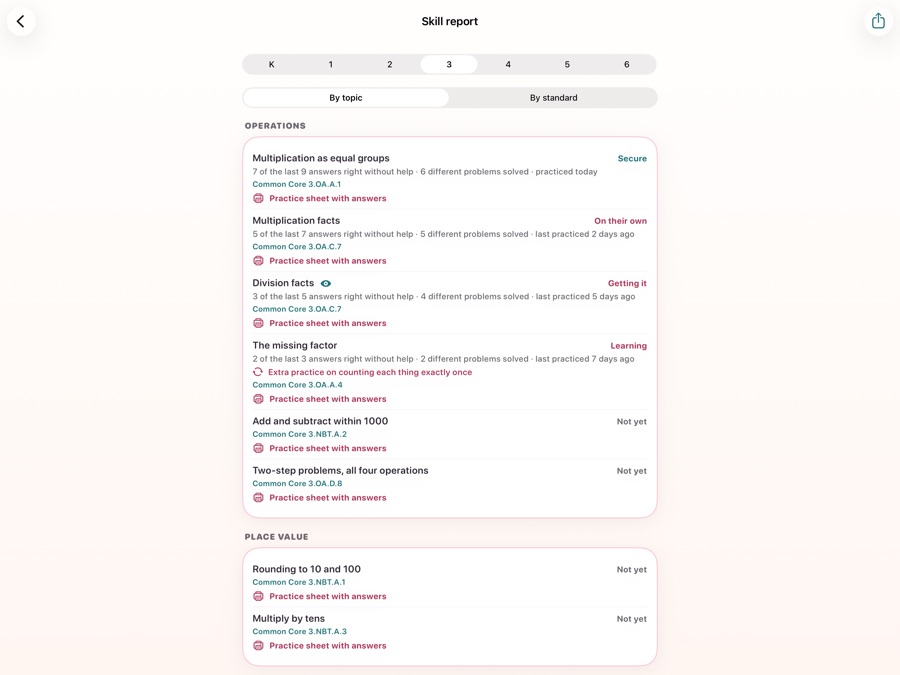
Every skill in a year with where it stands, how many of the last answers were right without help, when it was last practiced, and the Common Core code it meets. Read it by topic or by standard.
Practice sheets to print
Any skill, as a printable sheet of six problems a page with the pictures drawn the way the app draws them, and an answer key with the worked steps at the back.
A check-in, before and after
Ten short questions from your child's grade, with no hints and no right or wrong shown, about three minutes. Run it before and again after a few weeks. It does not change their progress, and the questions are the same both times so the two runs can be compared.
A placement quiz
Four questions a grade, moving up while they pass and down while they do not, to set the grade the course starts from. A skill it assumed they knew is given back to them the moment their own answers say otherwise.
Settings that matter
Several children on one device, each with their own progress. Bigger buttons, left-handed play, a slower pace, extra hints, dots under numbers, which ways of answering are on, the daily goal, and the story themes their word problems use.
More than one device
Families and classrooms
Link your own devices
Show a code on one iPad and scan it on the other. From then on they keep each other up to date over your home network whenever they are near each other: the children, where each one has got to, and your settings. No account, no server, and never over the internet.
Teacher mode
A teacher links student devices the same way, assigns skills and sees how everyone is doing, with no accounts and no roster to upload. On a shared family iPad a grown-up chooses which children are in the class, so a brother who is not in it is not sent. The teacher's device forgets any child it has not heard about for two months.